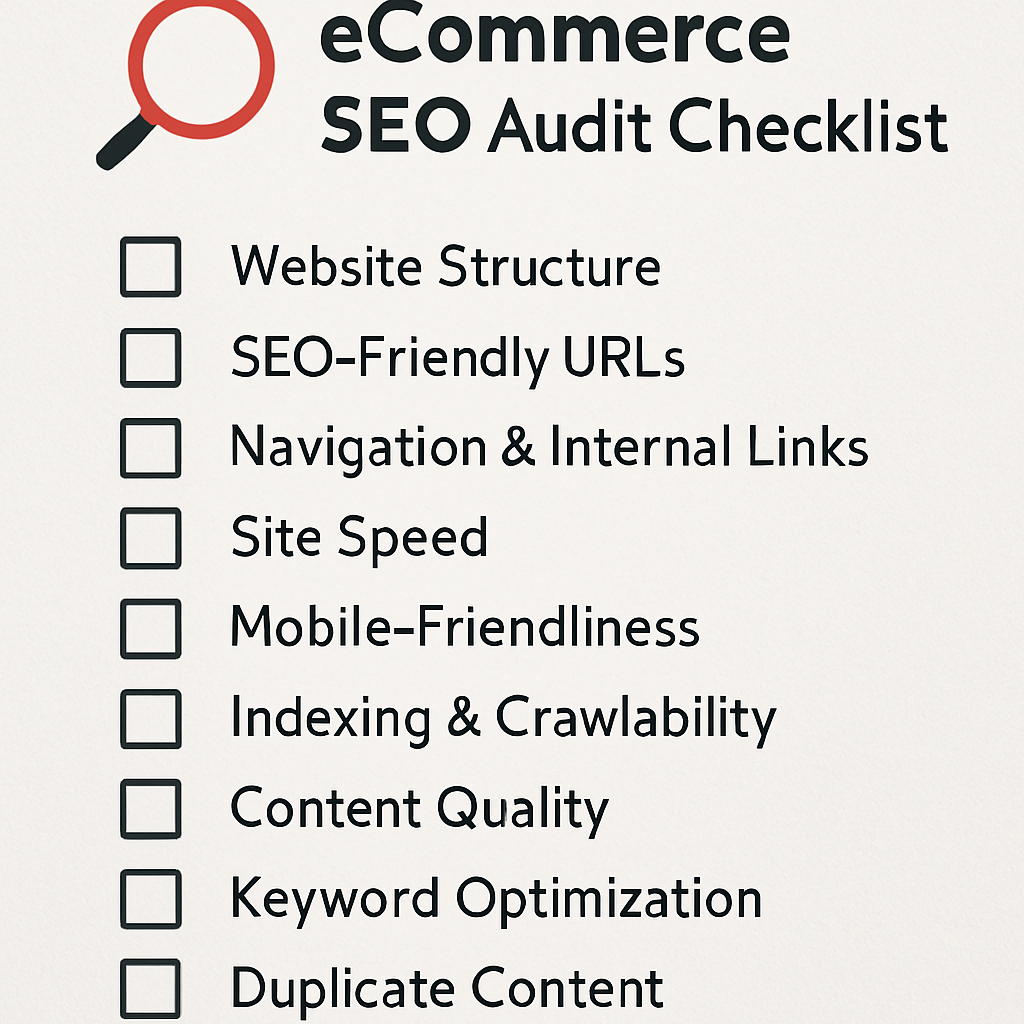

In the bustling world of e-commerce, standing out in search engine results is more crucial than ever for attracting potential customers. A comprehensive technical SEO audit can help identify and rectify issues that might be holding back your online store. In this detailed guide, we’ll walk you through the process of performing an e-commerce technical SEO audit, even if you’re not an SEO expert.

A technical SEO audit is a foundational element of maintaining a healthy e-commerce website. It helps you uncover issues that could prevent your site from ranking well in search engines. These issues might include broken links, slow page loading times, or improper use of keywords. By addressing these problems, you can improve your site’s visibility and user experience, ultimately leading to more sales.
Uncovering Hidden Issues
Many issues that affect your site’s ranking are not immediately visible. Technical audits dig deep into your website’s architecture, revealing problems like crawl errors and indexing issues. By uncovering these hidden issues, you can ensure that your site is fully accessible to search engines and users alike.
Improving User Experience
A well-optimized site not only ranks higher but also provides a better experience for visitors. Issues like slow load times and poor mobile optimization can frustrate users and lead to higher bounce rates. By conducting a technical SEO audit, you can pinpoint these issues and enhance your site’s usability.
Boosting Search Engine Visibility
Search engines are constantly evolving, and keeping up with the latest SEO best practices is essential. A technical SEO audit helps you stay ahead of the curve by identifying outdated practices and implementing the latest strategies. This proactive approach can significantly boost your site’s visibility in search engine results.
Step 1: Crawling Your Website
The first step in any technical SEO audit is to crawl your website. Crawling helps you see your site the way a search engine does. Use tools like Screaming Frog SEO Spider or Sitebulb to crawl your site and identify issues such as broken links, duplicate content, and missing metadata.
Conducting a Crawl
- Download and Install a Crawling Tool: Choose a tool that fits your needs and budget. There are many options available, ranging from free tools to more advanced paid versions. Evaluate your needs and select the one that offers the features you require.
- Run the Crawl: Enter your website URL and let the tool do its job. This process can take some time, depending on your site’s size. Be patient, as a thorough crawl is crucial for uncovering all potential issues.
- Review the Results: Pay special attention to errors and warnings, as these indicate areas that need attention. Look for patterns in the errors to identify systemic issues that may require broader changes.
Identifying Broken Links
Broken links can severely impact user experience and your site’s SEO performance. Use the crawl results to find broken links and prioritize fixing them. Consider creating a spreadsheet to track these links and note the necessary actions to resolve them.
Analyzing Duplicate Content
Duplicate content confuses search engines and can lead to lower rankings. Use the crawl results to identify pages with duplicate content. Determine if these pages can be consolidated or if canonical tags need to be added to signal the preferred version.
Checking Metadata
Metadata, such as title tags and meta descriptions, plays a critical role in SEO. The crawl will reveal missing or duplicate metadata, providing an opportunity to optimize these elements. Ensure each page has unique and relevant metadata that accurately reflects its content.
Step 2: Analyzing Site Speed
Site speed is a critical factor in user experience and SEO. A slow-loading site can frustrate users and lead to higher bounce rates. Google also considers site speed when ranking websites.
Checking Site Speed

- Use Google PageSpeed Insights: Enter your website URL to get a detailed report on your site’s performance. This tool provides a comprehensive analysis of your site’s speed and offers actionable recommendations.
- Identify Areas for Improvement: Look for suggestions in the report, such as optimizing images or reducing server response time. Pay close attention to high-impact issues that can significantly enhance speed when addressed.
- Implement Changes: Work with your web developer to make necessary adjustments. Prioritize changes based on their potential impact and feasibility, starting with the most critical improvements.
Optimizing Images
Large or unoptimized images can drastically slow down your site. Use tools like TinyPNG or ImageOptim to compress images without sacrificing quality. Consider implementing lazy loading to defer image loading until they’re needed.
Enhancing Server Response Time
A slow server response time can affect your entire site’s speed. Analyze server logs to identify bottlenecks and work with your hosting provider to address them. Consider upgrading your hosting plan or switching to a more reliable provider if necessary.
Minifying CSS and JavaScript
Excessive or poorly-optimized CSS and JavaScript files can slow down your site. Use tools like CSSNano and UglifyJS to minify these files, reducing their size and improving load times. Evaluate the necessity of each script and style to eliminate any redundant code.
Step 3: Ensuring Mobile-Friendliness
With more people using mobile devices to browse the internet, ensuring your site is mobile-friendly is essential. Google uses mobile-first indexing, meaning it primarily uses the mobile version of your site for ranking.
Testing Mobile-Friendliness
- Use Google’s Mobile-Friendly Test: Enter your website URL to see how easily a visitor can use your page on a mobile device. This tool provides insights into potential issues affecting mobile usability.
- Review the Results: The tool will highlight any issues, such as text that’s too small or elements that are too close together. Take note of specific areas that require improvement to enhance mobile user experience.
- Make Necessary Adjustments: Work with your developer to enhance your site’s mobile experience. Implement responsive design practices to ensure your site adapts seamlessly to different screen sizes.
Implementing Responsive Design
Responsive design ensures your site looks great on any device. Use flexible grid layouts and scalable images to create a consistent experience across devices. Test your site on various screen sizes to ensure all elements display correctly.
Optimizing Touch Elements
Touch elements, such as buttons and links, should be easy to interact with on mobile devices. Ensure these elements are large enough to tap without difficulty and spaced adequately to prevent accidental clicks.
Simplifying Navigation
Mobile users prefer simple, intuitive navigation. Use a clean, straightforward menu structure and consider implementing a mobile-specific menu, such as a hamburger menu, for easy access to key pages.
Step 4: Evaluating URL Structure
A clean and organized URL structure can improve user experience and SEO. Ensure that your URLs are descriptive and contain relevant keywords.
Reviewing URL Structure
- Check for Consistency: Ensure all URLs follow a consistent format and are easy to read. Consistent URLs enhance user trust and make your site easier to navigate.
- Avoid Dynamic Parameters: Use static URLs instead of dynamic ones that contain unnecessary characters or numbers. Static URLs are more search-engine-friendly and easier for users to remember.
- Use Hyphens to Separate Words: This makes URLs more readable for both users and search engines. Avoid using underscores or other characters that can complicate URL readability.
Organizing Categories and Subcategories
Properly structured categories and subcategories can enhance your site’s organization. Use a hierarchical structure to create clear pathways for users and search engines. Ensure each category has a unique and descriptive URL.
Implementing Canonical Tags
Canonical tags help prevent duplicate content issues by specifying the preferred version of a page. Use these tags to consolidate multiple URLs that lead to the same content, ensuring search engines index the correct version.
Utilizing Breadcrumbs
Breadcrumbs improve navigation by showing users their current location within your site. Implement breadcrumbs to enhance user experience and provide additional context for search engines.
Step 5: Reviewing On-Page SEO Elements

by rawkkim (https://unsplash.com/@rawkkim)
On-page SEO elements like title tags, meta descriptions, and header tags play a significant role in how search engines understand your content.
Checking On-Page SEO Elements
- Title Tags: Ensure each page has a unique and descriptive title tag containing relevant keywords. Title tags should accurately reflect the content and entice users to click.
- Meta Descriptions: Write compelling meta descriptions that accurately describe the page’s content and include keywords. Although meta descriptions don’t directly impact rankings, they influence click-through rates.
- Header Tags (H1, H2, H3, etc.): Use header tags to structure your content and make it easy for search engines to understand. Proper use of header tags enhances readability and highlights key sections of your content.
Crafting Engaging Titles
Your title tag is often the first impression users have of your page. Craft engaging titles that accurately reflect the content and include primary keywords. Consider using power words or numbers to make titles more compelling.
Writing Compelling Meta Descriptions
Meta descriptions should provide a concise summary of your page’s content. Use action-oriented language to encourage clicks and highlight unique selling points. Ensure each meta description is unique and tailored to the specific page.
Structuring Content with Header Tags
Header tags provide structure and hierarchy to your content. Use H1 tags for main titles, H2 tags for subheadings, and H3 tags for further subdivisions. Proper use of header tags improves readability and helps search engines understand your content’s organization.
Step 6: Ensuring Proper Use of Redirects
Redirects are essential for maintaining SEO when you move or delete pages. However, improper use can lead to issues.
Checking Redirects
- Use 301 Redirects: When permanently moving a page, use a 301 redirect to pass on SEO value. This ensures search engines and users are directed to the correct page.
- Avoid Redirect Chains: Redirect chains can slow down your site and confuse search engines. Ensure redirects point directly to the final destination to maintain site speed and clarity.
- Check for 404 Errors: Fix any broken links by redirecting them to relevant pages. Regularly monitor for 404 errors to ensure all links are functional and lead to valuable content.
Understanding Different Redirect Types
Not all redirects are created equal. Understand the differences between 301 and 302 redirects and use them appropriately. A 301 redirect is permanent, while a 302 redirect is temporary, and each affects SEO differently.
Preventing Redirect Loops
Redirect loops occur when a page redirects to itself or another page in a loop, causing endless redirects. Monitor your site’s redirects to prevent these loops, which can lead to poor user experience and SEO penalties.
Monitoring Redirects Regularly
Regularly check your site’s redirects to ensure they remain functional and relevant. Use tools like Screaming Frog or Google Search Console to identify issues and make necessary adjustments.
Step 7: Conducting a Content Audit
A content audit helps identify gaps and opportunities in your site’s content.
Performing a Content Audit
- Review Existing Content: Ensure each page provides value to users and contains relevant keywords. Assess content quality and relevance to determine if updates or improvements are needed.
- Identify Thin Content: Enhance pages with little content or merge them with related pages. Thin content can negatively impact SEO, so prioritize enhancing or consolidating these pages.
- Update Outdated Content: Refresh old content with new information and ensure it’s still relevant. Regular updates keep your content fresh and improve its chances of ranking well.
Evaluating Content Quality
High-quality content is essential for SEO success. Evaluate your existing content to ensure it meets quality standards and provides value to users. Consider factors like readability, accuracy, and engagement when assessing content quality.
Addressing Content Gaps
Identify areas where your site may lack comprehensive content. Conduct keyword research to discover new opportunities and create content that fills these gaps. Regularly updating and expanding your content can improve its relevance and ranking potential.
Enhancing User Engagement
Engaging content encourages users to spend more time on your site. Use multimedia elements like videos and infographics to enhance user experience. Encourage interaction through comments, social sharing, and calls to action.
Conclusion
Conducting a comprehensive e-commerce technical SEO audit is essential for maintaining a healthy website and improving your search engine rankings. By following these steps, you can identify and fix issues that may be hindering your site’s performance.
Regular audits will help you stay ahead of the competition, attract more visitors, and ultimately boost your sales. Whether you’re a seasoned pro or new to the world of SEO, this guide provides a straightforward approach to conducting a technical SEO audit for your e-commerce site.
By prioritizing technical SEO, you ensure that your site is not only visible but also offers a seamless experience for users, leading to increased satisfaction and conversion rates. Keep your site in peak condition by regularly revisiting and refining your SEO strategies.
Also Read Advanced URL Structure for E-commerce: Optimizing for Crawling & User Experience
About the Author